

- ◆ 游戏版本
- 1.21.1
- ◆ 服务端核心
- CatServer,Spigot,PaperSpigot,Magma,Arclight
- ◆ 前置/依赖
- PixelCore,PlaceholderAPI
- ◆ 模组加载器
- Forge
- NeoForge
- 其他
- ◆ 原作者
- laotou
原帖:https://bbs.mc9y.net/resources/177/
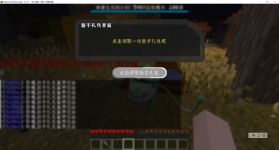
PixelDialogue 采用完全模块化设计,所有对话元素分为三类独立组件:
文本(Text)、按钮(Button) 和 界面(UI)
通过组合这些模块,你可以灵活构建任意复杂的 NPC 对话。
兼容老头的1.12.2的对话框配置内容
全部配置全版本无伤可迁移

PixelDialogue 采用完全模块化设计,所有对话元素分为三类独立组件:
文本(Text)、按钮(Button) 和 界面(UI)
通过组合这些模块,你可以灵活构建任意复杂的 NPC 对话。
兼容老头的1.12.2的对话框配置内容
全部配置全版本无伤可迁移
文本模块(texts/welcome.yml)
YAML:
# plugins/PixelDialogue/texts/welcome.yml

name: welcome

title: "&6宝可梦中心"

text: |

  &f你好!需要治疗你的宝可梦吗?

&e请选择下方选项按钮模块(buttons/yes.yml)
YAML:
# plugins/PixelDialogue/buttons/yes.yml

name: yes
display: "&a[ 是 ]"
material: EMERALD
commands:
  # 普通命令(以玩家身份执行)
  - "heal"
  - "msg %player% &a治疗完成!"

  # 控制台命令(以服务器后台执行)
  - "console:give %player% diamond 64"
  - "console:say %player% 获得了治疗!"

  # OP 命令(临时获取OP权限执行)
  - "op:spawn"

  # 聊天消息
  - "chat:谢谢大家!"

  # 延迟执行(20 tick = 1秒)
  - "<delay:20>console:say 玩家 %player% 1秒后触发了这条命令"
  - "<delay:5s>console:say 玩家 %player% 5秒后触发了这条命令"

  # 组合使用:延迟 + 命令
- "<delay:5s>console:give %player% emerald 10"界面模块(ui/nurse.yml)
YAML:
# plugins/PixelDialogue/ui/nurse.yml

name: nurse

title: "&6护士乔伊"

size: 27

items:

  13: { type: text, name: welcome }   # 中心显示文本

22: { type: button, name: yes } # 底部显示“是”按钮如何绑定到NPC或雕塑以及方块
YAML:
对准目标实体或方块,执行命令:

# 绑定到实体(如雕塑、村民、宝可梦)

/poked bind entity nurse

# 绑定到方块(如工作台、箱子)

/poked bind block shop_menu

现在右键该实体/方块,即可触发界面按钮对话!指令总览:
| 模块 | 指令 | 作用 |
|---|---|---|
| 管理 | /poked reload | 重载所有配置 |
| 资源 | /poked create <button|text|ui> <名称> | 创建组件模板 |
| /poked del <button|text|ui> <名称> | 删除组件 | |
| 绑定 | /poked bind entity <UI名> | 绑定到生物(右键触发) |
| /poked bind block <UI名> | 绑定到方块(右键触发) | |
| /poked unbind | 解除当前目标绑定 | |
| 预览 | /poked open <玩家> <UI名> | 强制打开对话界面 |
| /poked close <玩家> | 关闭玩家当前界面 | |
| 编辑 | /poked add <button|text> <UI名> <组件名> | 向 UI 动态添加元素 |
| /poked remove <button|text> <UI名> <组件名> | 从 UI 移除元素 |
![G(AQW$Z29ZWQCZUG`F@CU]H.png](/data/attachments/14/14315-d8628623fe8ca3ed0023d8205a89818c.jpg?hash=2GKGI_6Mo-)