


- ◆ 支持核心
- Spigot
- ◆ 插件前置
- PlaceholderAPI
- ◆ 游戏版本
- 1.21.1
原帖:https://bbs.mc9y.net/resources/177/
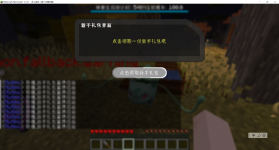
PixelDialogue 采用 完全模块化设计,所有对话元素分为三类独立组件:文本(Text)、按钮(Button) 和 界面(UI)。通过组合这些模块,你可以灵活构建任意复杂的 NPC 对话。
应该兼容1.12.2的配置内容!
定义对话内容与标题:
# plugins/PixelDialogue/texts/welcome.yml
name: welcome
title: "&6宝可梦中心"
text: |
&f你好!需要治疗你的宝可梦吗?
&e请选择下方选项。
定义交互按钮的行为与外观:
# plugins/PixelDialogue/buttons/yes.yml
name: yes
display: "&a[ 是 ]"
material: EMERALD
commands:
- "heal" # Pixelmon 治疗命令
- "msg %player% &a治疗完成!"
# plugins/PixelDialogue/ui/nurse.yml
name: nurse
title: "&6护士乔伊"
size: 27 # 支持 9, 18, 27, 36, 45, 54
items:
13: { type: text, name: welcome } # 中心显示文本
22: { type: button, name: yes } # 底部显示“是”按钮
# 绑定到生物(如雕塑、村民、宝可梦)
/poked bind entity nurse
# 或绑定到方块(如工作台、箱子)
/poked bind block shop_menu
 现在右键该实体/方块,即可触发无输入框的纯按钮对话!

PixelDialogue 采用 完全模块化设计,所有对话元素分为三类独立组件:文本(Text)、按钮(Button) 和 界面(UI)。通过组合这些模块,你可以灵活构建任意复杂的 NPC 对话。
应该兼容1.12.2的配置内容!
步骤 1:安装插件
- 将 PixelDialogue.jar 放入服务器的 plugins/ 文件夹
- 启动服务器 → 自动生成配置目录
步骤 2:创建模块
 文本模块(texts/welcome.yml)
定义对话内容与标题:# plugins/PixelDialogue/texts/welcome.yml
name: welcome
title: "&6宝可梦中心"
text: |
&f你好!需要治疗你的宝可梦吗?
&e请选择下方选项。
 按钮模块(buttons/yes.yml)
定义交互按钮的行为与外观:# plugins/PixelDialogue/buttons/yes.yml
name: yes
display: "&a[ 是 ]"
material: EMERALD
commands:
- "heal" # Pixelmon 治疗命令
- "msg %player% &a治疗完成!"
点击后执行命令列表(支持 %player% 占位符)
material 支持任意 Minecraft 物品 ID(如 PAPER, REDSTONE, ENDER_PEARL)
🖼 界面模块(ui/nurse.yml)
将文本与按钮组合成完整对话界面:# plugins/PixelDialogue/ui/nurse.yml
name: nurse
title: "&6护士乔伊"
size: 27 # 支持 9, 18, 27, 36, 45, 54
items:
13: { type: text, name: welcome } # 中心显示文本
22: { type: button, name: yes } # 底部显示“是”按钮
items 使用 库存格子索引(0–53) 定位元素
可在同一 UI 中添加多个按钮或文本(例如加一个“否”按钮)
步骤 3:绑定到游戏对象
打开游戏,对准目标实体或方块,执行命令:# 绑定到生物(如雕塑、村民、宝可梦)
/poked bind entity nurse
# 或绑定到方块(如工作台、箱子)
/poked bind block shop_menu
现在右键该实体/方块,即可触发无输入框的纯按钮对话! PixelDialogue 指令总览
| 模块 | 指令 | 作用 |
|---|---|---|
 管理 管理 | /poked reload | 重载所有配置 |
| 资源 | /poked create <button|text|ui> <名称> | 创建组件模板 |
| /poked del <button|text|ui> <名称> | 删除组件 | |
 绑定 绑定 | /poked bind entity <UI名> | 绑定到生物(右键触发) |
| /poked bind block <UI名> | 绑定到方块(右键触发) | |
| /poked unbind | 解除当前目标绑定 | |
| 👁 预览 | /poked open <玩家> <UI名> | 强制打开对话界面 |
| /poked close <玩家> | 关闭玩家当前界面 | |
 编辑 编辑 | /poked add <button|text> <UI名> <组件名> | 向 UI 动态添加元素 |
| /poked remove <button|text> <UI名> <组件名> | 从 UI 移除元素 |
![G(AQW$Z29ZWQCZUG`F@CU]H.png](/data/attachments/14/14315-d8628623fe8ca3ed0023d8205a89818c.jpg)